What Codex Actually Delivered in Truly Analytics
Six weeks of weapons grade smash. Don't shut me down US GOV.
- business
- technical
- ai
- business
- ai junkies
- jaded devs
I built Truly Analytics from scratch in six weeks with AI assistance, then analysed the git history to find out what the AI really wrote, what survived and where I held my ground.
Abstract 
I built Truly Analytics from a blank repository to a working v1.0 product in six weeks, using OpenAI Codex as an engineering accelerator rather than an autonomous replacement for software development.
This article analyses the resulting git history to quantify how much AI-generated code was committed, how much survived to v1.0, which parts of the system remained human-dominated and where AI assistance proved most useful. Across 137 commits and 21,031 committed lines, Codex contributed heavily to mechanical implementation work such as routing, database access, admin UI, caching, email integration and Kubernetes scaffolding. Human-authored code dominated the more product-specific and production-sensitive areas, including client-side analytics, enrichment logic, event handling, infrastructure decisions and final integration.
The main finding is that AI-assisted development was highly effective when the task was bounded and pattern-driven, but human judgment remained decisive where architecture, product context, security and operational risk mattered. The useful metric was not how much code AI could generate, but how much of that code survived real development, review, replacement and release.
There’s huge bias in this as there’s only one engineer and one agent so individual variations could not be eased out of the data. However, given how rare this level of analysis and situation is it’s still worth the study.
Note: This is a personal write-up of a personal project on my personal site and doesn’t include any professionally commissioned work, so the tone is more direct and informal than a formal corporate case study.
Introduction 
Truly Analytics is the full production solution to a persistent issue I first ran into about ten years ago while working at a publishing and media firm.
Back then, we knew analytics had problems because of ad blocking, but I never got the chance to do much about it. One weekend, I patched together a proxy. It worked quite nicely, but then I hit a geolocation problem which I decided to leave for another day. My role at that media company was my last permanent role before freelancing, and freelancing became both intense and more financially rewarding than startup work.
With new AI technologies and changes in my life circumstances plus the market being such a mess that I don’t want to deal with it, I came back to the idea and gave it another go. This time, the aim was to productionise it and solve the problem properly. Also, I wanted to do it in a quick timeframe without shipping garbage, once it’s done I don’t want to spend my time doing patch jobs, I want it to be performant and long standing.
This requirement became the Truly Analytics product built in six weeks from first commit to v1.0 launched across all my digital properties and rolling out to case study partners. Compared to my POC a decade ago it uses newer cloud infrastructure, now mature languages such as Go & SolidJS and pulls in a few other techniques to produce a modern, working, scalable version of the original prototype.
The six weeks build time included AI assistance for code generation using Codex GPT 5.3-codex. Codex worked inside an isolated, containerised development pipeline with a strict wrapper. It had access to the code in a controlled manner through a fully provisioned image, and it could only generate the code in place before handing back control to the wrapper. Even the Git workflow was restricted. Codex wrote the code, while the wrapper controls around Codex created the branch and handled the push & PR creation.
Codex did not have direct access to the Git repository, secrets, database or anything else. It had outbound internet to research and, you know, work, but couldn’t connect to internal services. The wrapper would pull down the code, pull down prompts from my configured prompt library, kick off the codex process and then captured the outputs and send it into github whilst opening a PR. If Codex made a mess it would keep the container running and alert me and I would manually shell in to rescue what I could. Usually this was just my auth going stale which I refreshed and then restarted the job. Therefore auth failures did not affect the below stats.
The wrapper was needed for a few reasons:
- I don’t have the time or patience to clean up some of the larger messes AI agents are provably causing. If it deleted the database I’d have quit IT entirely, I just don’t have the patience for that sort of thing so best prevent it instead
- Codex had some practical issues. For example, Codex would sometimes make changes, forget to commit them, and then trash the whole thing. Because it was running as an isolated job in a Kubernetes environment, that work would be lost forever and need to be done again. I always wanted a commit and PR so I needed the determinate output of a wrapper and code rather than the indeterminate output of an LLM
- All the data goes to external services, in this case OpenAI. I don’t want my secrets and other considerations going to OpenAI
- The pipeline is a true pipeline, meaning the environment is transitory. I’m not baking in everything so it needs some setup anyway, hence a wrapper.
This analysis covers v1.0 of the product, completed and made available six weeks after the first commit. Since then, I have added substantially more complex features, including Network Intelligence and Event Hooks. Those are conceptually quite simple, so Codex has been relatively good at assisting with them, but that would be a separate analysis and it’s assistance has been more research and architectural pairing than code.
For now, this covers the core features of Truly Analytics: the Google Analytics proxy, the admin client, the backend management system and the engineering needed to handle tens of thousands of requests per second alongside the frontend JS running on each of those user devices.
Quick Method Summary 
- All code was grabbed from the v1.0 release whereby Truly Analytics went live to the internet, available for sign up and good to go
- It doesn’t include the features Truly Analytics is more known for such as Network Intelligence (determining the organisation origin for your users) or Event Hooks (tie specific analytics events into your CRM & other systems)
- It won’t include any code that wasn’t committed or was nuked from orbit (more on that later)
- The data is obfuscated in places for obvious reasons
- There’s technically 3 users here, me on my desktop, me on my laptop and then Codex who is it’s own git user, hence the reference to human and AI and not directly users
- Codex never works outside of that git user profile, so this is a test of codex as a coding agent not AI as a whole
Product 
Truly Analytics is essentially a drop in replacement for Google Analytics where you put it on your site, it handles privacy and consent better than standard GA and then sends the cleaned and protected data back into Google Analytics so you don’t have to replace your analytics stack. Acting as a guard between your users and Google also means that we can do cool things like add in Event Hooks so you can pass the data from specific events down to your other systems. I’ve also put in Network Intelligence which provides details on where your traffic is actually coming from such as VPNs, corporate networks, which organisations did what, etc.
It’s got a free 3-day no-card, no sales trial so you can see the finished result of this project live on your site.
Headline numbers 
| Metric | Number | Percentage / context |
|---|---|---|
| Total commits | 137 | 100% |
| Human commits | 107 | 78.1% |
| AI commits | 30 | 21.9% |
| Timeline | 6 weeks | First commit to v1.0 release |
| Total committed lines | 21,031 | 100% |
| AI committed lines | 8,886 | 42.3% |
| Human committed lines | 12,145 | 57.7% |
| Final surviving lines in v1.0 | 12,892 | 61.3% of committed lines |
| Final human lines | 8759 | 67.94% of TA is from a human |
| Final robot lines | 4133 | 32.06% of TA is from a tin can |
| Human surviving lines | 8,759 | 72.1% of human committed lines |
| Codex PRs rejected | 5 | 16.7% of AI commits / PRs |
| Codex PRs accepted | 25 | 83.3% of AI commits / PRs |
Questions answered 
How many lines made it into the final product? 
Human / AI Surviving LoC Sankey 
When measured over time, AI committed 8,886 lines of code throughout the project, all through Codex. Of those, 4,133 lines made it into the v1.0 release. That gives the AI code a survival rate of 46.5%. The remaining 4,753 lines it chucked in the mix, or 53.5%, were replaced or deleted.
The human, meaning me, committed 12,145 lines of code. Of those, 8,759 made it into the final version, giving the human code a survival rate of 72.1%. The remaining 3,386 lines, or 27.9%, did not make it. Ergo, my work has a 27.9% chance of needing a redo.
| Contributor | Lines committed | Lines surviving in V1 | Survival rate | Lines replaced / deleted | Replacement / deletion rate |
|---|---|---|---|---|---|
| AI / Codex | 8,886 | 4,133 | 46.5% | 4,753 | 53.5% |
| Human | 12,145 | 8,759 | 72.1% | 3,386 | 27.9% |
| Total | 21,031 | 12,892 | 61.3% | 8,139 | 38.7% |
Out of the human code, 546 lines were overwritten by AI. That is only 4.5% of the human’s committed lines. Botto knows good stuff when it sees it.
By contrast, 3,610 of the 4,753 AI lines that did not make it into v1.0 were overwritten by the human. That is 76.0% of the removed AI code.
So the pattern is clear. Less than half of the AI code survived, compared with more than 70% of the human code. Very little human code was overwritten by AI, but most of the AI code that disappeared was overwritten by the human.
Fixed is the term I would use as it wasn’t outright deleted. With a short development cycle it’s less likely to be “changed” as in it’s purpose altered but “changed” as in improved or replaced.
Language and directory breakdown 
Surviving LoC Stacked by Code Location & Owner 
The codebase is segregated across several directories at the root of the project.
The main codebase exists in the src directory, which contains backend code written exclusively in Go, plus a large amount of frontend code split across HTML, JSX, and JavaScript. The frontend code in src is the admin panel and proxy control system UI.
The client directory holds the frontend analytics code which is delivered to users. The other directories are far smaller and consist of:
ansible- custom playbooks and modules made for provisioning Google Analytics properties[root]- these are files held directly at the root of the project, usually configuration files for toolinghtml- contains locally hosted testing pages for analyticsscripts-contains local development scriptsdocs- documentation I think, Im a senior engineer so I’ve never looked at the docssql- database schemas and migration codek8s- manifests and playbooks for deploying out the proxy and admin server to kubernetesnginx- nginx configuration for local testing assets.vscode- no idea, never look at it, probably crap from vscodium
The codebase is really in src and client with everything else considered auxilary tooling.
In src the split between the robot and the meatbag is close to 50/50, slightly in favour of the human. AI contributed 2,211 surviving lines of Go, while the human contributed 2,671.
html was also in favour of the human, with 870 surviving lines against 519 from AI. This is the testing suite so Codex gave the framework and the lump of flesh tuned it up over time.
A per file breakdown is coming up in the next section but for now the obvious standout is that the JS and JSX are both AI-led.
The client code, which is the analytics collection code delivered into the user’s browser, was almost entirely human-owned. The human wrote 1,654 surviving lines, while only 353 AI lines survived. That means the human owns 82.4% of that directory. Post-release, this entire directory has effectively been refactored by the human, so it’s now entirely my problem.
The ansible directory controls positioning, infrastructure and a good chunk of code through custom ansible modules. AI partially contributed to its original structure, but it has effectively been fully managed by the human. All HTML and Python code in this directory was read, implemented and tested directly by the human. This was not affected by Codex directly, although it was assisted through the web interface. So AI did contribute here but more of a stack overflow than a stand alone agent. The end result is that the Ansible code is also human-based, including custom modules.
The root of the project is entirely an experienced developer putting together and copying over previously managed code, including Dockerfile, docker-compose.yml, .gitignore and other baggage and boilerplate. The opportunity was not available to the AI agent to populate this, I had it all sitting around already.
The docs directory is entirely AI-generated because, frankly, the human did not need to care that much about it. The k8s directory is very simple and human-managed, it’s a few manifests templated and handled with ansible copied from other projects.
That means most AI code went into basic Go structure, UI frontend boilerplate / styling and the majority of the interactive elements of the frontend app.
Where is AI dominant in the code? 
Surviving LoC Stacked by File Type & Owner 
| Area / language | AI lines | Human lines | Total lines | AI share | Human share |
|---|---|---|---|---|---|
| Go | 2,211 | 2,671 | 4,882 | 45.3% | 54.7% |
| HTML | 519 | 870 | 1,389 | 37.4% | 62.6% |
| JSX | 607 | 474 | 1,081 | 56.2% | 43.8% |
| JavaScript | 68 | 33 | 101 | 67.3% | 32.7% |
| Client analytics code | 353 | 1,654 | 2,007 | 17.6% | 82.4% |
AI dominance shows up clearly in the language breakdown, especially in the JavaScript frontend. The simple app.jsx file is AI-dominant and is one of the largest files in the project, as shown in the next section covering file sizes.
There are also two Go files where AI had a strong presence. These handle server routing, basic server management, database connectivity and SQL queries.
This project does not use an ORM - it uses SQL code directly in the provisioning, migrations and the queries from the application. The AI generated the boring scaffold code turning the raw SQL rows into the detination Go structs. That scaffolding was built out by AI and then tweaked by the human to provide the required functionality where it needed evolving.
Once the data was retrieved from the database, the human could do what he wanted across the rest of the codebase so the Go code performing these lookups was mostly written once and left to it. The end result is that AI provided the core replacement mechanic for populating objects, effectively replacing an ORM by generating the required SQL code directly for the Go objects.
AI also contributed Go code to kick off Kubernetes jobs. This code is mostly the same concept as the database code - set up scaffold code that handles the authentication, connection and communication to and from the Kubernetes API and then the human extends out the data sent and recieved. The data passed to and from these Kubernetes jobs were human-configured, but the mechanics of communicating with the Kubernetes API are rote and standard making use of a standard library to provide most functions such as opting to authenticate using a service account or a local client config file. That scaffold code is where the AI code persisted to release.
Finally, there is the HTML files styling the upgrade page, plus the HTML used for SES email templates. The AI basically one shot all of this stuff so I didn’t need to make changes. Good botto.
AI also persisted the SES Go code for all the same reasons as the Kubernetes code - it’s a standard framework that has a known setup with common conventions so it’s easy to copy and paste it in.
One final Go file is the cache code which handles in-memory caching, updating the cache, removing things from the cache and other simple mechanical jobs like that. A cache is simple to build and Go is pretty much engineered for network connected cache management so once again, it could be copied off the internet basically verbatim using a conventional implementation.
AI and file size 
File Size vs Ownership 
Here’s the fun stuff - in this project, all of the largest files are AI-dominated. The top three largest files are about three times the size of the average file or more. They are the same three files already discussed: the Go server code handling the mechanics of web requests (server.go which is file-17.go way over on the right), app.jsx which is file-01.jsx currently the biggest file, and the database store file-09.go which is hanging around at 700 LoC.
The human tends to prefer files around 300 lines long. AI does have some dominant files in that same range, but the human does not really go beyond 500 lines and clearly likes to cluster in a few hundred lines of code. My vscode on my main monitor does 106 lines on screen at once, so generally 2-5 screens per file is what I can tolerate. That is clearly the point where I get sick of scrolling, now it is mathematically quantified.
I care. Botto does not care.
How active were the commits? 
File Churn by Commit Scatter 
On the above graph, each dot maps the number of lines added and deleted, per individual commit, per file.
The human clearly deleted a lot of lines and would make commits that were simply deletions, with no additions. What a chad.
AI, by contrast, would make commits that added hundreds of lines without removing anything. What a psychopath.
There were more human commits overall, but the behavioural pattern is obvious - AI shoves that code in and hoards what it can. The human deleted things with wild abandon. The graph weighs up and to the left for the human, then down and to the right for AI.
The outliers really demonstrate this. One human commit added zero lines and deleted more than 900 lines of code. One AI commit added 800 lines and deleted only 150.
Where did AI contribute over time? 
Daily Lines added / deleted by Human / AI 
This graph shows lines of code added and deleted by the toaster and the petri-dish on a per day basis.
At the beginning, AI was dominant. It set up the basic code and smashed in two major commits of more than 1,000 lines, well ahead of whatever the hell the human was doing. Afterwards, there were large human spikes, including two commits of around 1,500 lines. One large-scale AI commit of around 1,200 lines landed in the middle of those two major human commits but came alongside a huge deletion streak by the fleshbag.
AI took a back seat for a while whilst the humie took over the main duties at a calmer pace before the Botto was once again summoned towards the v1 release. Overall things went hard during the first two thirds of May then went through a couple weeks of refinement afterwards.
There were more human commits and more human deletions. AI made very few deletions. Its pattern was large swathes of code dumped in, followed by human commits with large additions and, in most cases, healthy ratios of deleted lines.
The biggest human commit added 1,414 lines while also deleting more than 1,000 lines. That is behaviour the AI never matched.
Where did the human override AI code? 
Overwrite heatmap by file type 
The human overwrote AI code predominantly in Go and JavaScript, but did not touch the JSX much at all. JSX was one of the major surviving AI contributions.
The only place where AI did not have human overwrites was Markdown, almost certainly documentation that the human didn’t read. The AI claimed this land.
AI never touched the Ansible code the human made, any JSON the human wrote or any shell scripts. Every other language in the repository needed human touch-up on AI contributions.
Who committed the most? 
Share of Commits 
The human made 107 out of 137 commits. That is 78.1% of all commits.
AI made 30 out of 137 commits. That is 21.9% of all commits.
| Contributor | Commits | Share of commits |
|---|---|---|
| Human | 107 | 78.1% |
| AI / Codex | 30 | 21.9% |
| Total | 137 | 100% |
That ties reasonably closely to the amount of surviving code, but the AI code was not particularly strong in terms of how long it lasted.
To understand the real contribution, the non-quantifiable measures matter as well.
The non-quantifiable metrics 
Codex was built into a secure pipeline from the very beginning. All 30 of its commits were levelled through PRs into the codebase.
Of those PRs, five were rejected. That is a rejection rate of 16.7%.
One rejection was due to a trivial Tailwind CSS version change that was handled manually instead. I should have just handled this myself and never bothered with the bot, I don’t know why this occurred.
Another rejection was a debugging PR that had been given the wrong instruction. That was my mistake, but was worth deleting as the commit had 400 additions and only 5 deletions so more stuffing of code into the code base.
A third issue was mostly a code-merging problem, where Codex was working from an old branch. That work was replaced in a different branch and instruction so ultimately absorbed in elsewhere. Twas but a speedbump.
The final two rejected PRs included one literally described as trash by the human.
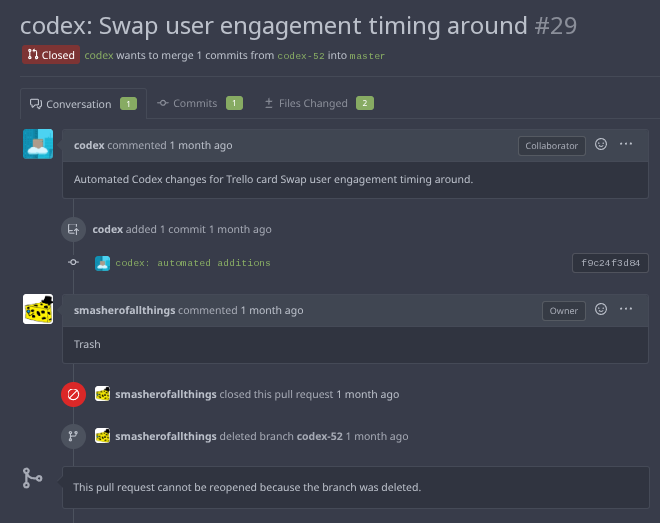
This trash PR dealt with the client code that runs the analytics. It vomited variables everywhere and turned what had originally been a handful of human-written lines into an overcomplicated muddled stack of crap. It made simple things, such as measuring timing on the frontend, a totally unjustifiable mess. This one really pissed me off if I’m honest as I wanted to take the easy way out and have the bot do it, but it failed miserably. This code sat in client.
The other handled trial restrictions. It included test code that was not really wanted and a load of over-complicated evaluation for trial accounts versus full accounts. That was so far off track that I did it separately in like 10 minutes and closed the PR.
Both were prime examples of agentic over-engineering. It was better condensed into a simpler, cleaner, faster model by a human with experience. I’ll be honest, I’m not sure if either of them actually worked. I took one look at the code and binned both for comprehension, maintainability and design reasons. Both might have operated, but I don’t know if the achieved the objective or not.
Overall reflection and summary 
The copy paste machine 
The parts of the codebase the agent contributed long term were mostly mechanical: server route handling, database access, and in-memory cache management. There was also a lot of JSX code that I kept including basically all of the admin panel code.
Speaking speculatively, and with knowledge of how these large language models work, that does not surprise me.
There are so many server frameworks, ORMs, database calls, and frontend examples out there that basic server and database handling are rote and common. They can be condensed into relatively simple patterns with usually one conventional, “good” way of doing it, and as such those conventions can be memorised, connected inside the model and spat out on demand.
For the frontend, there are so many open-source JSX component libraries that copy-pasting from them for basic web functionality was already how a lot of this worked before LLMs. Writing the same thing over and over again is tedious. Your website needs a button, some text, and a readable layout, that’s a solved problem copy pasted all over the web and an LLM providing it is just a sped up, easily customised version of this.
Where it falls over is the novel stuff. The backend code around data enrichment, event handling, and how each individual bit of data gets managed still needed to come from me if it was going to be done correctly and efficiently. There is nothing in the AI dataset, or sitting neatly out there on the web, that can hand that information back in a way where the model can just go off and do it.
Family furniture 
Another area where the LLM did not get much room to shine was the root project files: the Dockerfile, Docker Compose, Ansible deployments and Kubernetes manifests. These were copied over from previous human projects. They were already battle-tested and did not need AI generation. This is the family AK-47 vs something you 3D printed. Grandad’s Fender vs something in Guitar Center.
Also, these files tied into my other systems. For example, provisioning the database and database users also provisions connection secrets to the Kubernetes cluster. Hence nothing in this repository handles the database provisioning, it just has a reference on the kubernetes manifests to mount an already existing secret.
In that regard, there is nothing there for AI to use and nothing for it to do. It’s a solved issue already so no chance for the AI to shine or fail spectacularly compiling postgres from scratch.
The front end code dichotomy 
There was also a lot of churn on the client-side code, especially in the client directory where all the analytics stuff is. This is author opinion, but a lot of JavaScript code I have seen is utter trash. So yes, utter trash came through. When I say trash though I mean:
- performance
- clarity
- modular
- minimal
- without dependencies
The analytics code in client needs to be all of these things. JavaScript garbage all over the internet is none of these things. It failed. Horribly.
Taking a second to be a bit of a jerk, but hopefully an honest jerk: the JavaScript environment in my experience, from the foundation upwards, has an over-representation of lower-skill developers working inside it. That gives an LLM plenty of bad material to absorb. I think my experience is reflected in the continuous and massive number of problems that appear in the JS world and across that technology stack. Just, spend 10 minutes searching for npm security issues and you’ll see what I mean. Also leftpad.
I haven’t seen the same thing at the same levels in Go, Rust, C, or other backend languages, which are much sharper about preventing these kinds of issues for both security and code quality. JavaScript itself does not enforce the same level of correctness. So incorrect code leaks out into the world.
Also the tooling doesn’t support the agent and this showed up in the Codex logs. Botto would check for build errors when running Go, but in the JavaScript side there was not much else it could do. It was winging it more, and the human had to pick up the pieces.
That explains the churn and the overall human ownership of the client directory. That is the JavaScript code that goes out to all users, so it needs to be performant.
On the other side of the equation, when the frontend just needed to make something look pretty, fucking eh, Codex is way better than I am. One shotting the client upgrade page was a welcome surprise. I didn’t touch any CSS or other classes, it was glorious.
Would I use AI again? 
In this sort of project in this manner? Yes, absolutely.
Codex is great. I got the whole thing set up in no time at all and it uses the same models I use on the browser. The models are currently great for small throwaway tools or supporting software as well as isolated stand alone pieces of code. Even the graphs in this analysis were all from AI-generated ed. although I did need to bash them into shape to share the same page and styling. The software and git analysis framework code, including the instructions, were put together by AI, then I patched it together to produce this analysis.
As a research and typing automation tool, it is fantastic. But coding has such a small margin for error that it still needs someone who knows what they are doing. And when you add in a reasonably high minimum standard, no it just didn’t cut it most of the time.
There also needed to be controls which I had already implemented. I would not be running this again without my isolated pipeline and process. This bulletproofed myself against some of the nastier AI agent experiences that could have occured. At no point was this code anywhere near a production database. It was never in a position where it could touch my desktop, other data or anything like that.
An AI agent with that kind of access could blow up a database and instantly undo all the benefit it added.
I have zero regrets about building that pipeline. It stopped the work from becoming a loss and turned it into a gain. But that also makes it a required necessary part of my process.
Outside the Agent 
In terms of productivity, AI has helped me more with research, analysis, documentation, debugging, and typing than with final production-ready code. I would guess that the majority of my tokens across my subscription goes towards chatting to it as a buddy, a solutions architect or have it generating content as though it comes from someone who cares about what I care about. It’s not an extension of myself or a replacement of anyone else, but it’s own thing with it’s own benefits.
As such it’s at its best when I am dictating into it, using it to articulate my thoughts or asking it to generate basic things where I already know what the output needs to look like. Also research, the thing is great at research.
For serious coding for novel projects? Nope, still a way off. Just chucking something at AI and saying, “Do something novel, independent, and sensible,” especially when I do not know what the output should be, is not viable in my experience.
For $20 a month, right now, it is absolutely worth more than that. It feeds into my productivity, helps me get things out of the door faster, and removes a lot of the mental energy needed for tedious work. That includes things like server routing, or deciding which ORM to use. Instead, I can just generate SQL that works. As typing automation it’s better than using a framework - such as an ORM - that mainly exists to save me typing in the first place.
Errata 
Why this analysis? 
Mostly because I wanted to know.
When I am deep in the work for literally months, I have no real sense of how much I have done and how much the bot has done. In all honesty, as a predominantly solo engineer, it is still nice having the LLM helping. There have been very few times in my career when I have had a reliable engineer or co-worker who could handle the same work at the same time and pace and yet possess the same ownership as I do. Usually with humans we just split it up between us and we each own a chunk. With the AI, I’ve got a reliable deckhand right next to me.
The other aspect is the creativity. I get to bounce ideas around with the LLM, including product ideas, positioning and everything else. It is great for that. But who is actually putting the code in and making it reality? Turns out it was mostly me. And that is OK and probably what I wanted.
The other major reason for this analysis is to put some numbers to the sheer, unending stream of people screeching into the void about their productivity, while nothing much seems to come out the other end. You hear companies like Microsoft and Spotify talking about how their code is now mostly AI-generated, and yet it has never been a bigger pile of crap.
And as for the solo devs and smaller shops who still gloat about AI? Well, they do not seem to be doing that much either. So what’s the truth? How much did I actually get done with AI from start to finish in a crunch with a known end result? That’s this analysis.
Why OpenAI and Codex? 
Like pretty much everyone, OpenAI was the first LLM I used. I did not use it much for the first year or two because I had no need for randomly generated text that was not implemented or integrated with RAG, and therefore could not reference or source its own information.
Since then, it has been useful. Some of the code it generated before the last six to twelve months was not worth much, but by that point I was already using ChatGPT as a replacement for Google.
Gemini
When I was at Verizon, they had a contract with Google to use Gemini. However, every chat I had with Gemini broke down into arguments and me berating the bot. This wasn’t a healthy working relationship. Decent for generating images though.
Anthropic
I also have a free account with Anthropic, which I only have for AEO queries. I am not attracted to using it more because, frankly, Anthropic is full of nonsense.
If I pay them, it becomes a question mark. Will their APIs actually be online? Which credits are going to be used? If I say “openclaw” will it nuke my usage for no reason? Will I hit some fairly arbitrary credit limit and then be told to wait five hours? Will I select one model and then have them decide to downgrade my requests to a different model, or however that system works?
There is just too much operationally awkward evidence around Anthropic for me to want to depend on them.
There are a few other reasons as well. Hacker News and the usual crowd are big on Anthropic, but these are the same people who have spent years picking up every JavaScript framework that wandered past them. I learned to avoid what they suggest because they don’t seem to share the same values I have around efficiency, clarity and simplicity. Following this rule I have avoided react, angular and next.js instead landing on SolidJS. I have carved this rule into my chest so I never follow them into madness.
There is also the leadership and marketing side of Anthropic. I don’t think Sam Altman is a saint, but Dario Amodei is out to claim my income for himself using lies and other people’s cash. I could respect that if this wasn’t the same company that released its own client source code to the world by accident and had its Mythos model available if you just guessed what the endpoint was. Don’t piss on my leg and tell me it’s raining.
I’m not even going to get into the strategy of marketing yourself as an arms manufacturer and then being surprised where the government you’ve previously publicly told to fuck off starts treating you like an arms manufacturer. This was the same government that pushed Philip Zimmermann to put the full source code for PGP in a fucking book to defend against cryptography restrictions fucking 30 years ago. Apparently though Anthropic makes the best security model and knows all about this stuff. Yeah, ok.
Between that, the marketing and everything else, I do not want to deal with it. Anthropic is a massive drama bomb.
Copilot
Which one?
Open Source models
Yes. I’ll do this at some point. They’re basically just swapping out an API key so no rush currently. But they don’t have image generation and they often don’t RAG so search takes a hit. Otherwise sure.
The result
I am sticking with ChatGPT for now. My prompt libraries are tuned to do what I want with these models. Codex is perfectly fine and runnable the way I want it.
Ideally, at some point, I would switch parts of my business process to a local model for tedious things like GTM automation. That’ll be fine because it’s private, can handle emails and simple text and won’t leave the premises. That would be the next step for me.
What have I personally gained from this? 
The biggest thing I found was that even though I threw away about half the code the bot gave me, it still gave me code I would otherwise have had to write myself. That reduced the massive, daunting task of doing all of this, especially at the beginning.
In a way, one of the biggest benefits was breaking through that writer’s block. It gave me a framework I could hammer into shape, rather than having to go out and build everything from nothing.
I also think certain parts of the code are the sort of work I don’t like doing, and that is the code that has mostly been left in. Front end is a good example. If it looks good enough to me, that is just fine, I don’t care that much about the implementation flavour. I’m not going to get tedious about whether I use JSX classList versus string interpolation in the classes string. I prefer classList but whatever.
When it comes to the Go code though, the actual engineering, well that’s the stuff that will actually wake me up at 3 a.m. I am on that with no remorse. Same deal with the Ansible and other automation.
The build tools fall into this category as well. I know what I need to build - and from my years of dealing with Java nonsense in Gradle and Maven - I hate trying to fix tools that should just fucking work. Here is the input, there is the output, go.
So the stuff I care about most is the stuff I touch the most. That does not mean the stuff I did not touch was great, but I think there is a correlation there.
And when I am doing small projects like browser extensions and things like that, I actually do not need to touch the code it spits out too much. For those smaller pieces, it is fantastic.
So overall, I know where I can fit the botto in without remorse, I’m comfortable with it’s shortcomings and I’m happy knowing the numbers. I can still smash it just fine and I’m leaning on the botto in ways I find fruitful rather than diminuitive.